




Support center (714) 707-2483
Writen by Ryan R Goering
To generate high-quality local roofing leads through Google Local Services Ads (LSA), you must first complete the Google Screened verification process (license and insurance checks). Once active, maximize lead flow by maintaining a 4.5+ star rating, enabling the "message leads" feature, and answering incoming calls within 15 seconds to signal high responsiveness to Google’s algorithm.
Google Ads (PPC) charges you every time a user clicks your link, regardless of the outcome. Google LSA operates on a pay-per-lead model, meaning you only pay for valid phone calls or messages from local homeowners. Additionally, LSAs appear at the very top of search results, above traditional PPC ads.
In 2025, the cost per lead for roofing typically ranges from $45 to $120, depending on local market competition and seasonality. However, because these are high-intent leads (homeowners actively searching for service), the ROI is generally higher than traditional display advertising.
In military tactics, holding the high ground wins battles. In digital marketing, Google Local Services Ads (LSA) are that high ground. They sit at the absolute top of the search results—above the map pack, above the organic listings, and above traditional PPC ads.
If you are a roofer and you aren’t running LSAs, you are invisible to the 40% of customers who click the first thing they see.
Unlike standard SEO which takes time to build, LSA is a sprint to verification. Here is the Baadigi protocol for getting live fast:
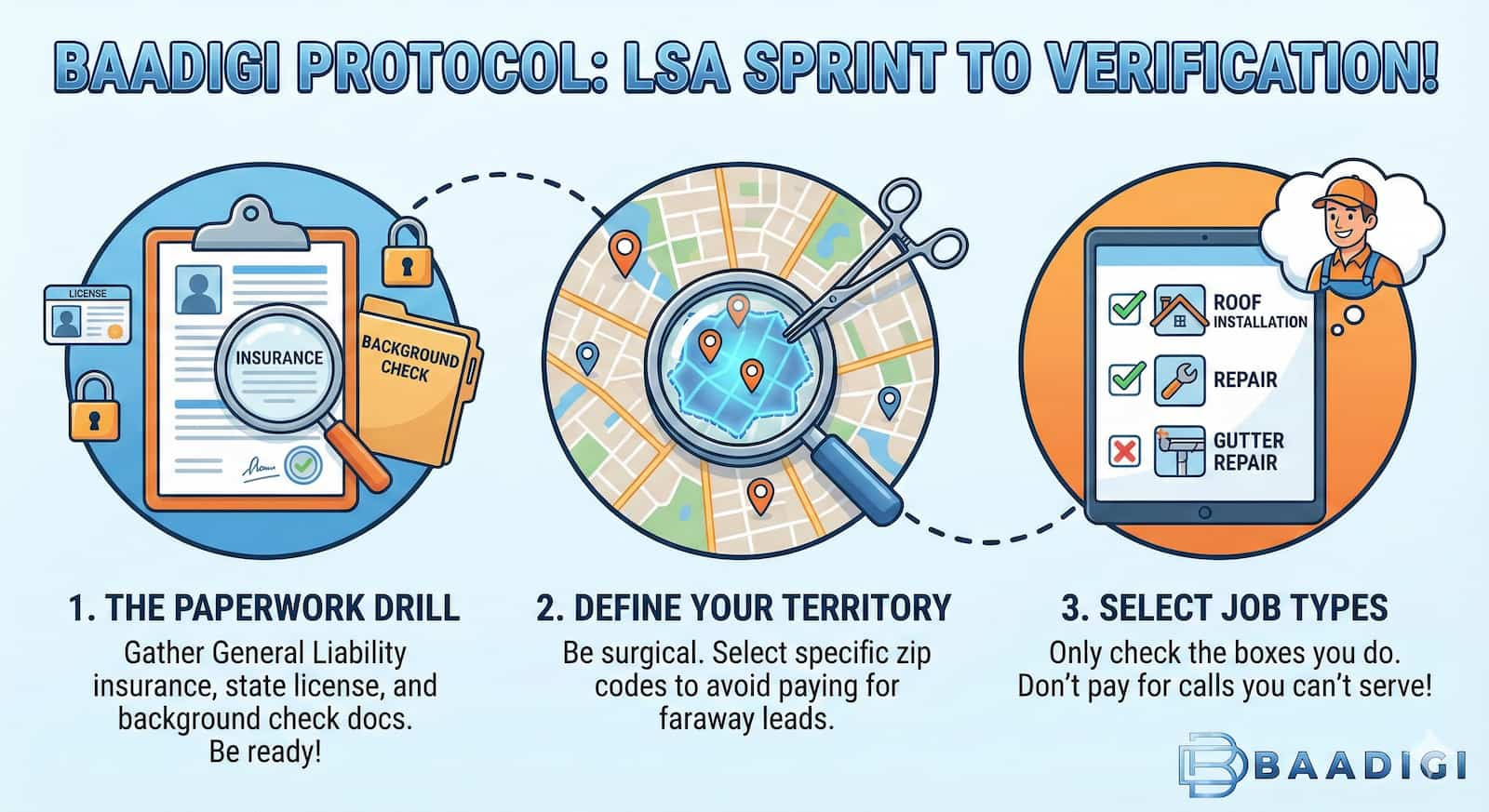
Just turning LSA on isn't enough. You are competing with every other roofer in town. Here is how we help clients outrank the competition:
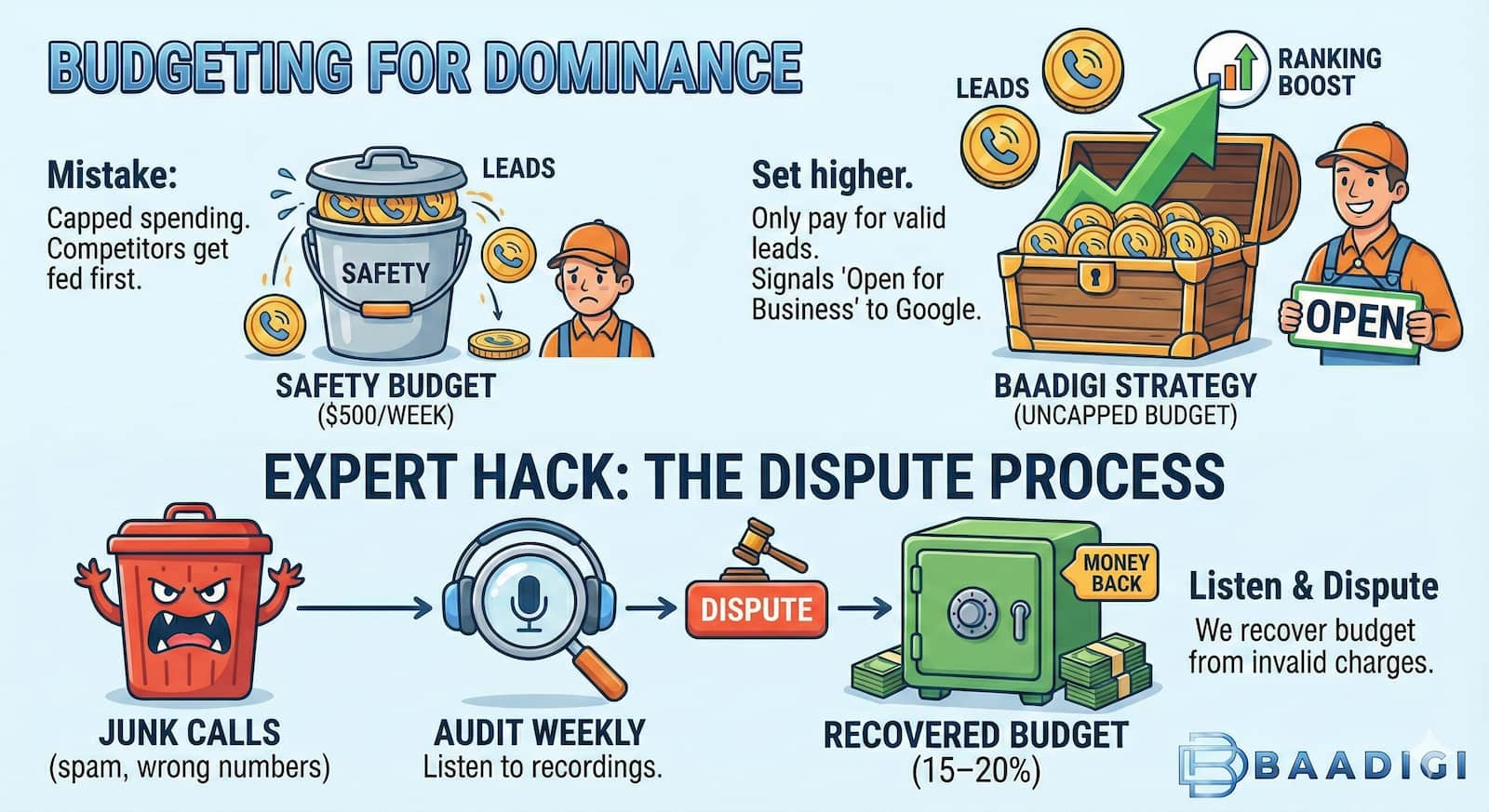
Many roofers make the mistake of setting a "safety budget." They cap spending at $500/week. The problem? If your competitors have open budgets, Google feeds them first.
The Baadigi Strategy: Set your weekly budget higher than you think you need. Since you only pay for valid leads, you won't blow the budget on junk. An uncapped budget tells Google, "I am open for business," which improves your ranking.
Here is where the amateurs lose money. LSA will charge you for spam calls, wrong numbers, and solicitors.
Can you run LSA yourself? Sure. But do you have time to listen to every call recording to dispute charges? Do you know how to adjust bidding strategies based on seasonal hail trends?
At Baadigi, we integrate LSA into a total "One Client Per Territory" strategy. We handle the disputes, the optimization, and the integration with your CRM, so you just handle the roof.
Managing Google LSA disputes, background checks, and bid strategies is a full-time job. Don't fall into the trap of doing it yourself while 20% of your budget goes to waste on spam calls. BaaDigi integrates LSA into a total growth strategy, ensuring you rank high and only pay for quality leads. Ready to own the top of Google search? Call us now at 714-707-2483 to get verified and live.
The verification process typically takes 2–5 weeks. The timeline depends heavily on the speed of the third-party background checks (Pinkerton or Evident) for the business owner and field workers.
You will still be charged for the lead if the call connected, but more importantly, Google’s algorithm punishes missed calls. Consistent missed calls will cause your ad to disappear from the top 3 spots.
Yes. In your profile settings, you can toggle specific job types (e.g., "Install new roof," "Repair roof," "Clean gutters"). Turning off low-value services helps you focus your budget on big-ticket installs.
Yes, your Google Business Profile (Map Pack) reviews are automatically synced to your Local Services Ad. This is why a strong overall reputation management strategy is critical for LSA success.
Absolutely. In fact, it levels the playing field. Because you don't need a massive website or years of SEO history to rank, a small company with great reviews and insurance can outrank a giant corporation on Day 1.
You must log into your LSA dashboard, navigate to the specific lead, and select "Dispute." You will need to select a reason (e.g., "Solicitor," "Service not offered," "Not in service area"). Google usually processes disputes within a week.
A Note from Founder Ryan Goering
I run my life and my business on four things: God, Family, Country, and Marketing.
I’ve failed before, and I’ll probably fail again. But I will always outwork the guy next to me to find the win. I’m not here to talk politics, and I’m not here to tiptoe around your feelings. If my bluntness offends you, you don’t have to keep reading—and we probably shouldn't do business together. I say what I mean, and I do what I say.
The Track Record I’ve been doing SEO since 2008 and running this agency since 2015. I’ve serviced over 2,000 contractors across every trade imaginable. I’ve seen thousands of campaigns succeed, and I’ve seen just as many fail.
The Hard Truth Here is what I’ve learned after working with 2,000+ of you: Most contractors treat marketing as an expense, not an investment.
You’ve been burned by agencies selling you "parts"—a Facebook ad here, some SEO there, maybe a shiny new website. That is "piecemeal" marketing. It’s like trying to build a truck with parts from five different manufacturers and wondering why it won't start.
The Solution: Predictable Work Engine™ That is why I stopped selling "services" and started installing Systems.
We don't ask if you "want" SEO or Social Media. We install the whole engine. My team builds your entire infrastructure—Website, SEO, Paid Ads, Social Media (SMM), and Automations—so they work together.
We Tune the Machine to Your Market. Every territory is different. In some cities, we might throttle the Ads to 60% and SEO to 20%. In others, we lean harder on Social Media. We tune the dials based on what your business needs to dominate your map.
The Goal? Fire the Lead Brokers. The entire point of this system is to get you off the "shared lead" drug (Angi, Thumbtack, HomeAdvisor). We build assets you own so you never have to compete for a lead again.
But here is the reality check: I can send you 100 exclusive leads tomorrow, but if your internal process sucks, you will still fail. You can't complain about lead quality if you don't answer the phone. I’m here to fix the engine so you can drive the growth.
My ONE Rule for Business: Treat your employees better than their spouses do. Make them want to come to work more than they want to stay home.